
62% of organizations had already moved beyond pure awareness into some stage of AI agent adoption in McKinsey's 2025 survey, and 23% were already scaling an agentic system in at least one business function according to McKinsey's State of AI report. This is a critical inflection point. The interesting question isn't whether an enterprise AI agent is real anymore. It's whether your company can run one without creating a new class of security, compliance, and operating problems.
That's where most pilot programs hit the wall.
Getting a single agent to summarize tickets, draft outreach, or route approvals is straightforward. Keeping dozens of agents useful, traceable, and safe across Slack, Salesforce, Jira, Zendesk, internal knowledge bases, and custom APIs is where architecture starts to matter. Teams quickly discover that the challenge shifts from prompting to operations. Security teams need oversight. Platform teams need isolation. Business owners need proof that the agent is saving time instead of adding review overhead. If you work in cyber operations, it's worth paying attention to how vendors are framing groundbreaking AI for security, because the same lesson applies across the enterprise. AI becomes valuable when it's embedded into real workflows with control points, not when it lives as a demo.
Table of Contents
- The New Digital Coworker Is Here
- What Exactly Is an Enterprise AI Agent
- Key Use Cases and Benefits Across the Business
- Designing a Secure Enterprise Agent Architecture
- A Proactive Governance and Compliance Checklist
- Your Roadmap to Implementing and Scaling AI Agents
- Governing Your Agents Is the New DevOps
The New Digital Coworker Is Here
An enterprise AI agent is no longer a lab concept. It's becoming part of how companies execute work.
The commercial shift is happening fast. A 2026 industry synthesis says Gartner projects 40% of enterprise applications will embed task-specific AI agents by the end of 2026, up from under 5% in 2025, and the same synthesis places the global AI agents market at roughly $10.9 billion to $12.1 billion, with projections that it could exceed $50 billion by 2030 according to this enterprise AI agents market analysis. Even with the usual caution around market forecasts, the direction is clear. Agents are moving into mainstream software, especially for specialized, multi-step work.
That matters because enterprises don't adopt infrastructure trends evenly. They start inside a function where the economics are obvious. Sales ops. Support triage. Internal service desks. Finance workflows. Then the problems appear.
The work changes after the first success
A pilot usually proves one narrow point. The model can classify tickets. The workflow can write a draft. The CRM update can happen automatically. But production introduces a different standard.
Once the agent touches systems of record, four questions show up immediately:
- Who approved its access
- What actions can it take without review
- How do you investigate a bad action
- How do you stop ten teams from building ten unmanaged variants
The winning teams don't treat an enterprise AI agent as a feature. They treat it as an operator that needs identity, scope, logs, and supervision.
Why this changes the architecture conversation
Most executives still frame the topic as automation. Practitioners know it's closer to workforce design. A deployed agent can read from one system, reason across context, and act in another. That makes it useful. It also makes it risky if the controls are shallow.
The opportunity is real. So is the burden of running it well. The rest of the article focuses on that practical middle ground. Not the hype version where agents replace everything, and not the defensive version where security says no to all autonomy. The durable path sits in between.
What Exactly Is an Enterprise AI Agent
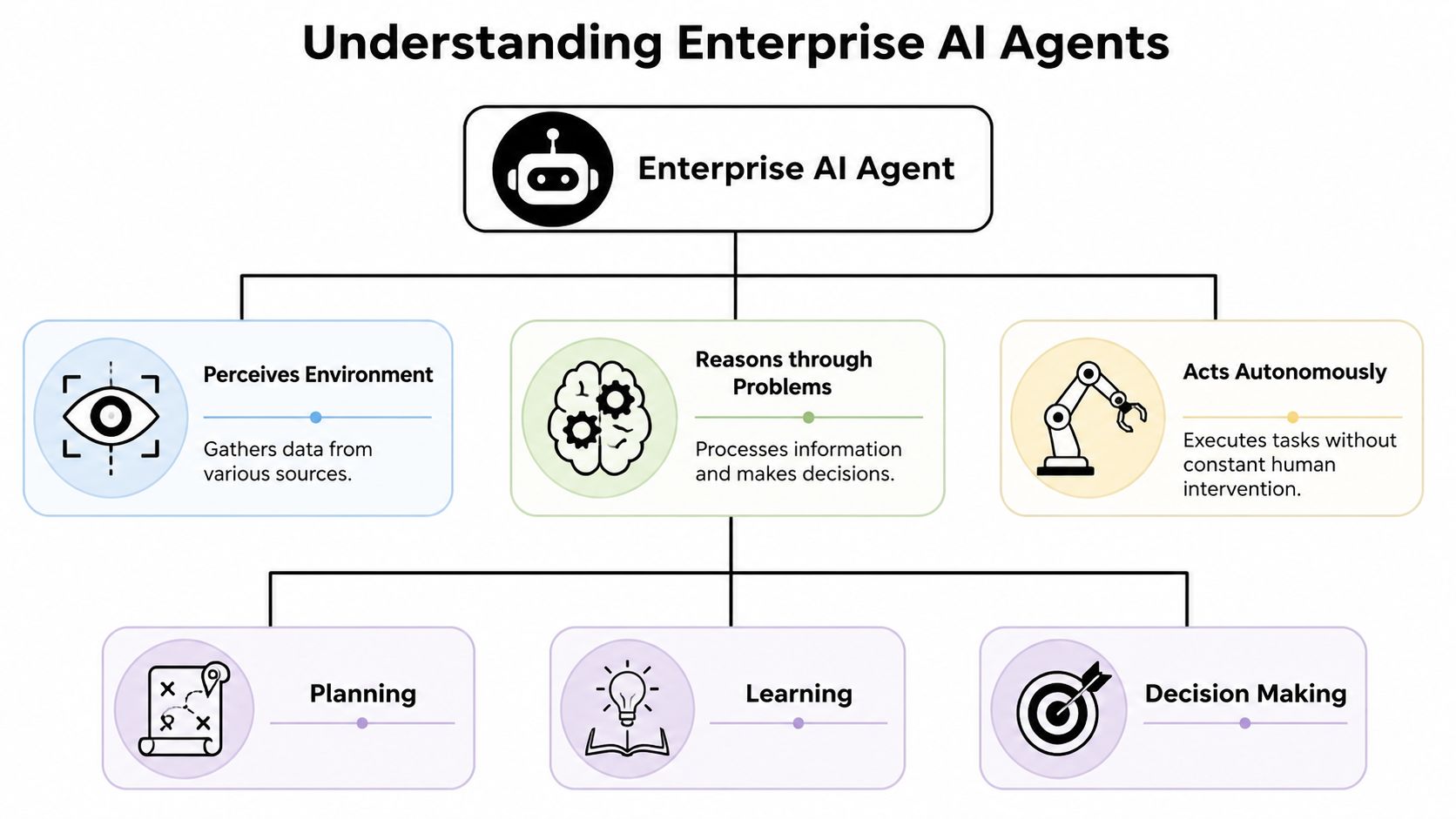
An enterprise AI agent is an autonomous software system that can perceive context, reason about what to do next, and take action through tools. The key difference from a simple assistant is that it doesn't stop at generating text. It operates in a loop.
More than a chatbot with better wording
A chatbot answers questions. An enterprise AI agent can inspect a ticket, pull order history, check a knowledge base, create a case, draft a response, and route an approval if confidence is low. That's a different class of system.
A useful analogy is a specialist intern with API access. Give that intern a narrow role, clear permissions, good documentation, and an escalation path, and they become productive. Give them broad access, weak supervision, and unclear goals, and they become a source of mistakes. Agents behave the same way.
According to Dust's explanation of enterprise AI agents, production systems operate on a continuous perception, reasoning, and action loop. The same source notes that real deployments typically rely on a four-tier model: engagement, autonomous or action, AI and ML, and data layers. That architecture matters because it grounds the agent in actual enterprise systems rather than isolated prompts.
If you want a concrete example in revenue operations, these AI GTM agents are a useful reference point for how agents can be focused on specific go-to-market workflows instead of pretending to be universal assistants.
The four layers that make it enterprise ready
The four-tier model is a practical way to separate concerns.
| Layer | What it does | Why it matters |
|---|---|---|
| Engagement | Handles interfaces such as chat, email, internal portals, or messaging apps | Keeps user interaction separate from execution logic |
| Autonomous or action | Plans tasks, chooses tools, coordinates steps, and manages state | This is where the agent behaves like an operator |
| AI and ML | Provides reasoning, classification, extraction, and generation | Supports decision making, but shouldn't own every business rule |
| Data | Connects to systems of record such as CRM, ERP, ticketing, and knowledge stores | Prevents the agent from acting on stale or invented context |
This is why many teams get tripped up when they describe agents as “smart chatbots.” The intelligence isn't the main breakthrough. Stateful orchestration is.
What stateful orchestration looks like in practice
Production agents usually need:
- Memory persistence so they can track prior steps and current task state
- Planning logic so they can break work into smaller actions
- Tool integration through APIs, ticketing systems, CRMs, knowledge stores, and internal services
- Verification loops so they can check whether an action succeeded before moving on
That's also why companies exploring AI employees should think less about prompt quality and more about orchestration quality. If the system can't maintain state, follow scoped tool paths, and recover from partial failures, it isn't ready for enterprise work.
Practical rule: If the task requires crossing system boundaries, handling exceptions, and preserving traceability, you're no longer designing a chatbot. You're designing an operational system.
Key Use Cases and Benefits Across the Business
The best enterprise AI agent use cases aren't generic. They sit inside repeatable workflows where a human currently spends time gathering context, making a routine judgment, and pushing work across systems.
That usually means the first wins show up in teams with high work volume, fragmented tools, and lots of structured follow-through.
Sales and revenue teams
A sales agent is useful when it does more than write cold emails.
In a mature setup, the agent can review inbound form submissions, enrich account context from internal notes and CRM history, draft outreach tied to the buyer's segment, log activity into Salesforce, and queue follow-up tasks for an account executive. That removes a lot of manual coordination work from business development reps and sales ops.
The benefit isn't just speed. It's consistency. Every lead gets the same baseline research pattern, the same CRM hygiene, and the same handoff structure.
A common mistake is asking one agent to own the entire funnel. That creates brittle logic fast. Better results usually come from splitting responsibilities. One agent qualifies and routes. Another drafts follow-up. A third monitors stalled opportunities and prepares summaries for pipeline review.
Support and service operations
Support is one of the cleanest fits for agents because the workflow is already structured.
An agent can read an incoming Zendesk ticket, classify intent, search the knowledge base, check order status or account metadata, and either draft a response or resolve a standard request automatically. When confidence is weak or the customer issue is sensitive, it hands the case to a human with the context already assembled.
That changes the shape of support work. Human agents stop spending as much time on repetitive triage and retrieval. They spend more time on exceptions, escalations, and relationship-sensitive interactions.
If an agent saves time but leaves the support rep hunting through three systems to verify its work, you haven't automated the job. You've shifted the burden.
Back office and operations
Operations teams often gain the most benefit from agents because so much of the work is cross-system coordination.
Examples include:
- Procurement support where an agent reviews incoming requests, validates policy requirements, creates a draft purchase order, and routes it for approval
- Internal IT service desks where an agent triages requests, checks entitlement rules, resets common workflows, and opens the right downstream tickets
- Supply chain workflows where an agent watches for data anomalies, gathers context from inventory and purchasing systems, and prepares recommended actions for human review
In these cases, the value comes from shrinking the gap between signal and action. The agent notices, assembles context, and moves the process forward before someone has to chase it manually.
Where the gains are real and where they aren't
Agents work best when the workflow has these traits:
- Clear boundaries around what the agent can decide versus what needs approval
- Reliable systems of record so the agent can ground decisions in current data
- Repetitive task patterns where orchestration matters more than creativity
- Recoverable failure modes so a missed step doesn't create unacceptable business risk
They work poorly when the process itself is broken, undocumented, or politically fragmented.
That's worth stating plainly. Many failed deployments aren't AI failures. They're workflow failures with a model attached. If humans don't agree on the process, an agent won't magically stabilize it.
Designing a Secure Enterprise Agent Architecture
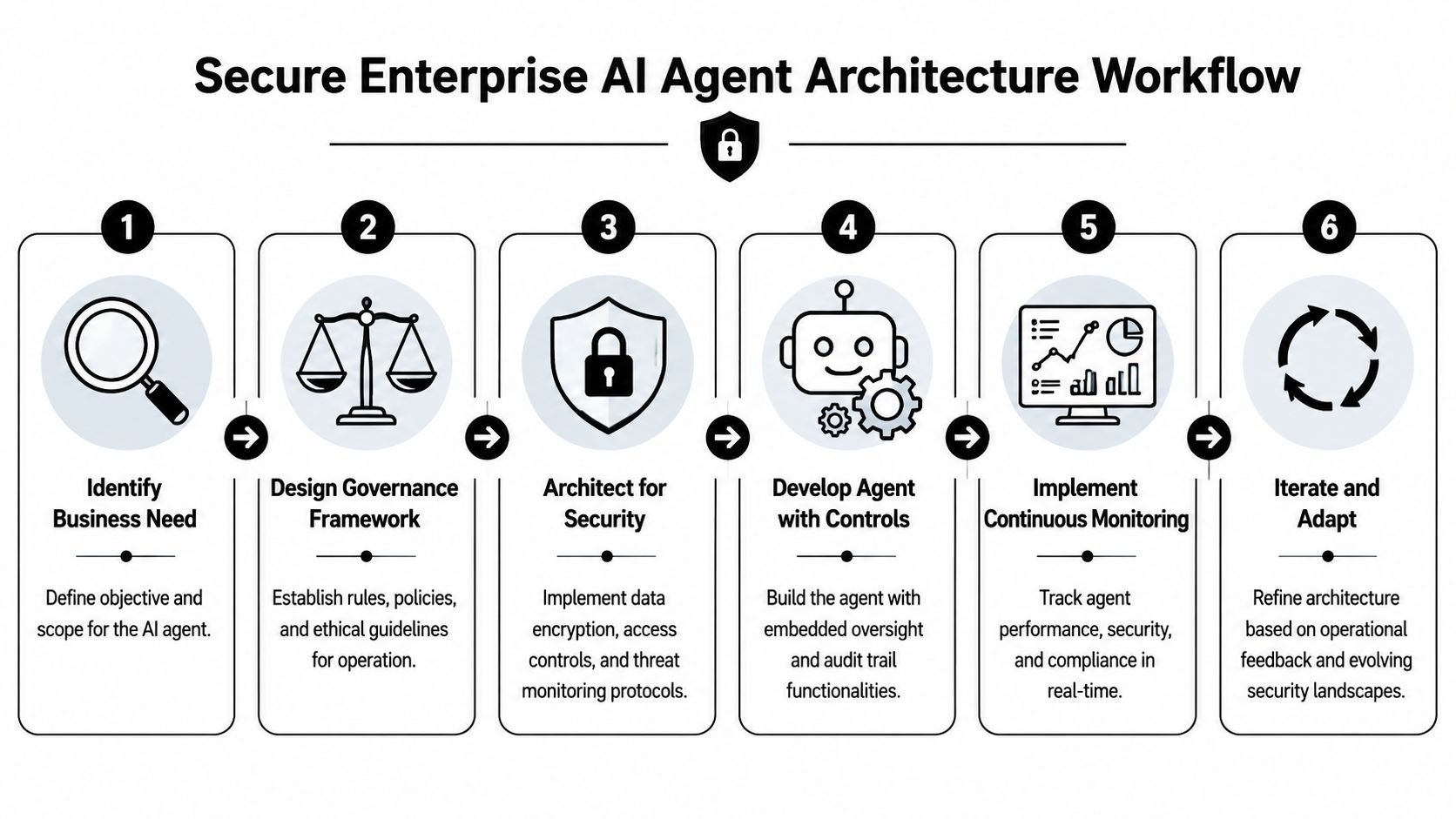
Security controls for an enterprise AI agent can't be layered in after the pilot. Once an agent can move across applications, trigger API calls, or operate through browser sessions, the blast radius changes.
That's why enterprise deployments need governance inside the architecture itself.
Why governance has to be part of the platform
According to Anaplan's enterprise-ready AI agent guidance, the core requirement is governance-by-design, including auditable traces, enforced RBAC, and ring-fenced execution environments. The same guidance recommends monitoring every action and API call, centralizing audit logs, and using secure retrieval pipelines.
That list maps closely to what breaks in production.
When teams rush, they often wire an agent directly to broad service accounts, skip action-level logging, and assume model behavior is the primary risk. It usually isn't. The bigger risk is unscoped action. The agent had enough access to do something consequential, and nobody can reconstruct exactly how it happened.
The controls that actually matter in production
A secure architecture usually includes several control layers working together.
- Isolated execution environments keep one agent's runtime and dependencies from bleeding into another workload. Containers or similarly ring-fenced runtimes matter when different business units, clients, or data sensitivity levels share the same platform.
- Least-privilege access prevents the common trap where an agent inherits broad permissions solely because integration is easier that way. If an agent only needs read access to a CRM object and write access to a ticket note, don't give it account-wide administrative capabilities.
- Per-role approvals help when the workflow touches customer communication, finance actions, identity changes, or regulated records. The key is to gate high-consequence actions without forcing review on every low-risk operation.
- Centralized audit logs let security and compliance teams see the full chain. Which prompt or event triggered the action. Which tools were called. What data was retrieved. What action was attempted. Whether a human approved it.
A concise design review often looks like this:
| Control area | Minimum standard | Failure if absent |
|---|---|---|
| Identity and access | Scoped credentials and RBAC | Agents accumulate broad permissions |
| Execution | Isolated runtime boundaries | Cross-workload contamination and weak containment |
| Observability | Action-level logs and API traces | Poor incident investigation |
| Data handling | Approved retrieval paths only | Sensitive data leaks into prompts or outputs |
| Approvals | Human checkpoints for sensitive actions | Unreviewed destructive or customer-facing actions |
The architecture should answer a simple question for every agent action. Was it allowed, was it logged, and can someone explain it afterward?
Security testing needs to match agent behavior
Traditional application testing won't cover all of this. Agents behave through sequences. They chain retrieval, reasoning, tool use, and follow-up actions. That means you need to test permission boundaries, prompt-triggered edge cases, and unsafe tool combinations, not just model output quality.
Teams looking at production risk should also study what comprehensive AI pentesting looks like in practice. The useful mindset is to test the full operational surface, especially where the agent can cross data and tool boundaries.
A secure enterprise AI agent isn't just a model behind a login. It's an identity-bearing operator inside your environment. Build it that way from the beginning.
A Proactive Governance and Compliance Checklist
The governance problem starts after the first useful deployment.
One team launches an internal support agent. Another builds a sales assistant. A third connects a browser-based agent to back-office systems. Individually, each project looks manageable. Collectively, they create a new operating surface that standard app governance usually doesn't cover well enough.
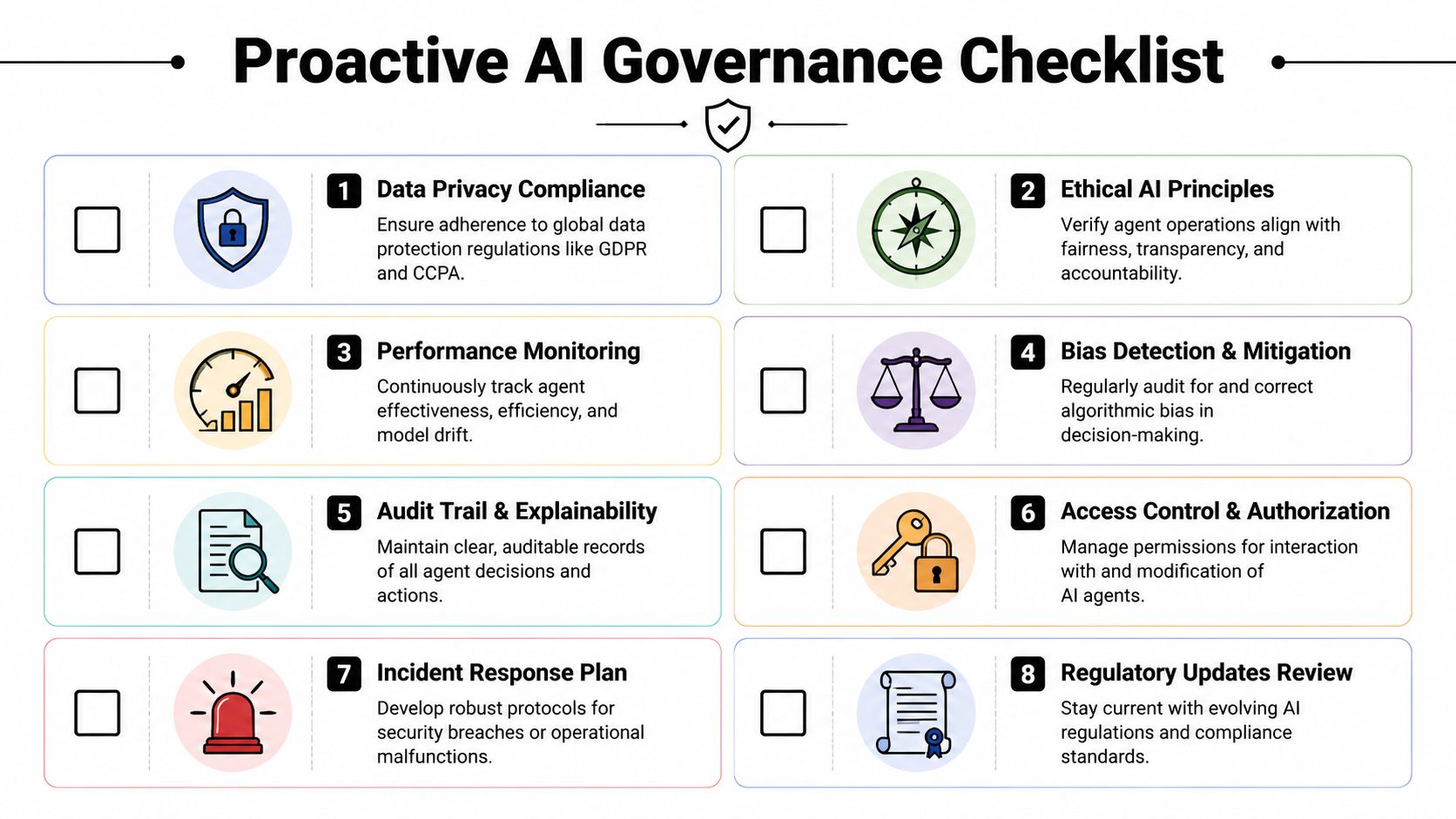
According to the Cloud Security Alliance analysis of enterprise AI agents, enterprises are already dealing with agents that exceed permissions and create shadow AI, and governance frameworks are struggling to keep pace. That aligns with what many architecture teams are seeing firsthand. Initial controls may exist on paper, but drift appears quickly once multiple agents, teams, and tools are involved.
What to monitor continuously
A one-time security review isn't enough. Governance has to become operational.
Use this checklist as a working standard:
- Inventory every active agent. Track owner, purpose, connected systems, credentials used, approval rules, and environment. If an agent exists without a clear owner, that's already a governance failure.
- Review permission scope regularly. Agents tend to accumulate access over time because teams add “just one more integration.” That's how privilege creep starts.
- Monitor tool usage patterns. Look for tools being called outside the expected workflow. Unauthorized tool paths often surface before a major incident does.
- Require human approval for sensitive actions. Customer communications, financial actions, identity changes, and record deletion should have an explicit approval gate.
- Log retrieval and action chains together. It's not enough to know that the agent produced an output. You need to know which data it saw and which tools it invoked along the way.
- Create an incident playbook. Security teams need a repeatable response when an agent acts outside policy, exposes restricted data, or performs a harmful action.
What compliance teams should demand before scale
Compliance leaders should ask sharper questions than “does it have audit logs.”
Ask these instead:
- Can we prove what data informed a specific agent decision
- Can we detect when one workflow starts calling tools outside its approved set
- Can we compare permissions granted to permissions used
- Can we suspend one agent instance without disrupting unrelated workloads
- Can we demonstrate that regulated or sensitive data is limited to approved retrieval paths
Those questions usually reveal whether the organization has real control or just initial setup documentation.
For privacy-heavy environments, it also helps to align operating controls with principles like scoped access, traceability, and accountability. Donely's privacy manifesto is one example of the kind of policy framing teams should expect from platforms and internal programs alike.
Governance for agents isn't a launch checklist. It's a continuous detection problem.
The practical stance that works
The most resilient teams don't try to eliminate autonomy. They reduce uncontrolled autonomy.
That means they allow agents to move quickly inside narrow lanes. They monitor action paths, enforce access boundaries, and require approval where consequences rise. This is stricter than normal chatbot governance because agents can do more than speak. They can act.
If your current governance model only evaluates model outputs and ignores permissions, tool use, and runtime behavior, it's incomplete.
Your Roadmap to Implementing and Scaling AI Agents
Most organizations don't fail because the pilot was useless. They fail because the pilot never turns into a repeatable operating model.
That usually happens when the first success creates pressure to expand before the foundations are ready.
The practical warning comes from Invisible's guidance on enterprise agentic AI strategy. It notes that many organizations stall after pilots because of data silos, governance gaps, and change management overhead, and that successful programs avoid agent sprawl by starting with narrow use cases, measuring productivity against supervision costs, and building a repeatable model for scale.
Start narrow and instrument everything
The first production candidate should be boring in the right way.
Pick a workflow with clear boundaries, known owners, and measurable operational pain. Good examples include support triage, sales follow-up drafting, internal service desk routing, or procurement intake. Avoid broad mandates like “build a company research agent” or “automate rev ops.”
A good first deployment has:
- One business owner who owns the workflow outcome
- One operational team responsible for runtime behavior
- A narrow action scope with clear escalation rules
- Observable inputs and outputs so you can review performance and supervision cost
What matters at this stage isn't scale. It's whether the team can tell, in plain operational terms, if the agent is helping.
Choose a platform that prevents agent sprawl
Platform choice matters more after pilot than during pilot.
You need a way to run isolated workloads, manage permissions per instance, centralize logs, and monitor usage without inventing a new DevOps layer for each agent. For organizations that want a managed option, Donely integrations show the kind of breadth that matters in practice because production agents usually need to connect to business tools, not just models. Donely is one example of a platform that provides multi-instance deployment, per-instance RBAC, isolated containers, and unified audit logs. Those traits matter because they reduce the tendency for every team to spin up a separate unmanaged stack.
Use a selection lens like this:
| Decision area | What to look for |
|---|---|
| Isolation | Separate instances or runtimes for different teams, clients, or workloads |
| Access control | Granular RBAC and scoped credentials |
| Monitoring | Unified logs, action traces, and operational visibility |
| Billing and governance | Centralized administration instead of fragmented spend |
| Integration model | Connectors for the systems your workflows already use |
A short platform walkthrough helps make that concrete:
Build an operating model before you expand
Scaling an enterprise AI agent program is less about adding more agents and more about standardizing how new ones are approved, monitored, and retired.
The operating model should define:
- Intake criteria for new use cases
- Security review rules for data access and tool permissions
- Approval policies for sensitive actions
- Evaluation standards for usefulness and human review burden
- Ownership rules for incidents, change requests, and decommissioning
This is the point where many teams realize they need product management discipline, not just prompt engineering.
A pilot proves the technology can work. An operating model proves the organization can live with it.
The companies that scale well don't chase the most advanced possible agent first. They build a system for producing safe, boring, useful agents repeatedly. That's how an enterprise AI agent program becomes durable instead of chaotic.
Governing Your Agents Is the New DevOps
The hard part of enterprise AI isn't getting one agent to work. It's creating a system that can run many agents safely, visibly, and economically.
That's why governance is becoming the equivalent of DevOps for this category. Not a blocking function. An enabling one. DevOps made it possible to ship software repeatedly without losing operational control. Agent governance plays the same role for autonomous systems. It gives teams a way to deploy useful automation without surrendering traceability, policy enforcement, and change discipline.
The pattern is clear. Teams that succeed define narrow use cases, design around access boundaries, log every meaningful action, and build approval paths for high-risk work. Teams that struggle usually skip one of those steps because the pilot looked harmless.
An enterprise AI agent should be treated like a digital coworker with credentials, scope, and accountability. That framing improves architecture decisions immediately. It changes how you set permissions, how you test workflows, and how you review incidents.
The market opportunity is large. The operational burden is real. The organizations that benefit most will be the ones that learn how to govern agents as a portfolio, not as isolated experiments.
Donely gives teams a practical way to run that model. If you need a single place to deploy, isolate, monitor, and govern AI employees across business units or client environments, Donely is built for that operating reality.