
Finding a host that isolates each tenant’s data while keeping you out of the ops nightmare is a real pain. In this guide we break down the most capable platforms that give you containerized hosting with scoped data access for SaaS. You’ll see how each option handles isolation, IAM, audit logs, and deployment speed, and we’ll point out where Donely shines the most.
1. Container Orchestration with Fine‑Grained Access Control
Managed container orchestration lets you run containers on clusters without touching underlying servers. The real power comes from fine‑grained access roles that you can attach to each task. By giving a role only the permissions it needs, you keep every SaaS tenant’s data locked down.
When you launch a task, you can map a unique access role to that task definition. The role can read from a specific storage bucket, write to a dedicated database table, or call a limited set of APIs. Because the role is scoped at the task level, one tenant can never see another tenant’s resources.
The access system also supports condition rules that let you add extra checks, such as source IP or multi‑factor status. Those checks add a second layer of security for high‑risk actions.
For auditability, audit logs record every API call made by the role. You can stream those logs to a central monitoring tool or storage bucket for later review.
Pros:
- Native integration with cloud services.
- Fine‑grained permissions via access roles.
- Built‑in audit trails.
Cons:
- Requires understanding of access policies.
- Complexity grows with many tenants.
- Costs can rise with high traffic.
When you need a platform that already talks to your existing cloud data stores, this approach is a solid pick. It works well for SaaS products that already live in a cloud ecosystem.
We’ve seen teams use Donely’s OpenClaw hosting as a front‑end while the orchestration handles the heavy lifting behind the scenes. The combination gives you instant deployment with the security of per‑task access.
2. Serverless Container Platform with Network Perimeter Controls and Data Isolation
A serverless container platform runs containers on a fully managed serverless environment. It scales to zero, so you only pay for what you use. The secret sauce for SaaS isolation is network perimeter controls.
Network perimeter controls let you create a data perimeter around a set of cloud resources. When you attach a container service to that perimeter, the service can only access resources inside the same perimeter. This means a tenant’s container instance can’t reach another tenant’s database or storage bucket.
Access is further tightened with identity and access management. You can grant the service account attached to each container revision only the roles it needs. The combination of perimeter and IAM makes for a double‑lock.
Audit logs are captured in activity logging. Every request, API call, and policy change is recorded and can be exported to an analytics platform for deep analysis.
Pros:
- Zero‑ops scaling , no servers to manage.
- Strong perimeter security with network perimeter controls.
- Integrated logging and monitoring.
Cons:
- Limited to a single cloud ecosystem.
- Serverless limits on request time and memory.
- Perimeter setup can be intricate for newcomers.
Because the platform is serverless, you can spin up a new tenant in seconds. That matches the speed promised by Donely’s platform, which reports sub‑second deployment for its AI agents.
Ready to see how fast it can be? Try it yourself.
3. Containerized Hosting with Private Endpoints , Network‑Level Scoping
A managed environment for micro‑services and containerized workloads often offers built‑in support for sidecar proxies, which makes service‑to‑service communication easy and secure.
For scoped data access, you can attach a Private Endpoint to each containerized workload. A Private Endpoint creates a private IP address inside your virtual network, so traffic never traverses the public internet. You can then place each tenant’s app in its own subnet and restrict network access with standard firewall rules.
Identity is handled by the cloud provider’s managed identity service. Each workload gets a unique identity that can be granted just‑in‑time access to a secret store, database, or any other resource. The identity can be limited to read‑only or write‑only as needed.
Audit logs flow through a central monitoring service and can be sent to a log analytics workspace, giving you a searchable record of who accessed what and when.
Pros:
- Network isolation via Private Endpoints.
- Managed identity per workload.
- Built‑in observability.
Cons:
- Requires a Virtual Private Cloud setup.
- Pricing can be opaque for bursty traffic.
- Learning curve for service mesh and Private Endpoint config.
Network‑level isolation is a great fit for SaaS firms that already run workloads in a virtual private cloud. If you pair it with Donely’s per‑instance RBAC, you get a double barrier: network‑level plus role‑based controls.
4. Container Orchestration with Policy‑Based Data Access
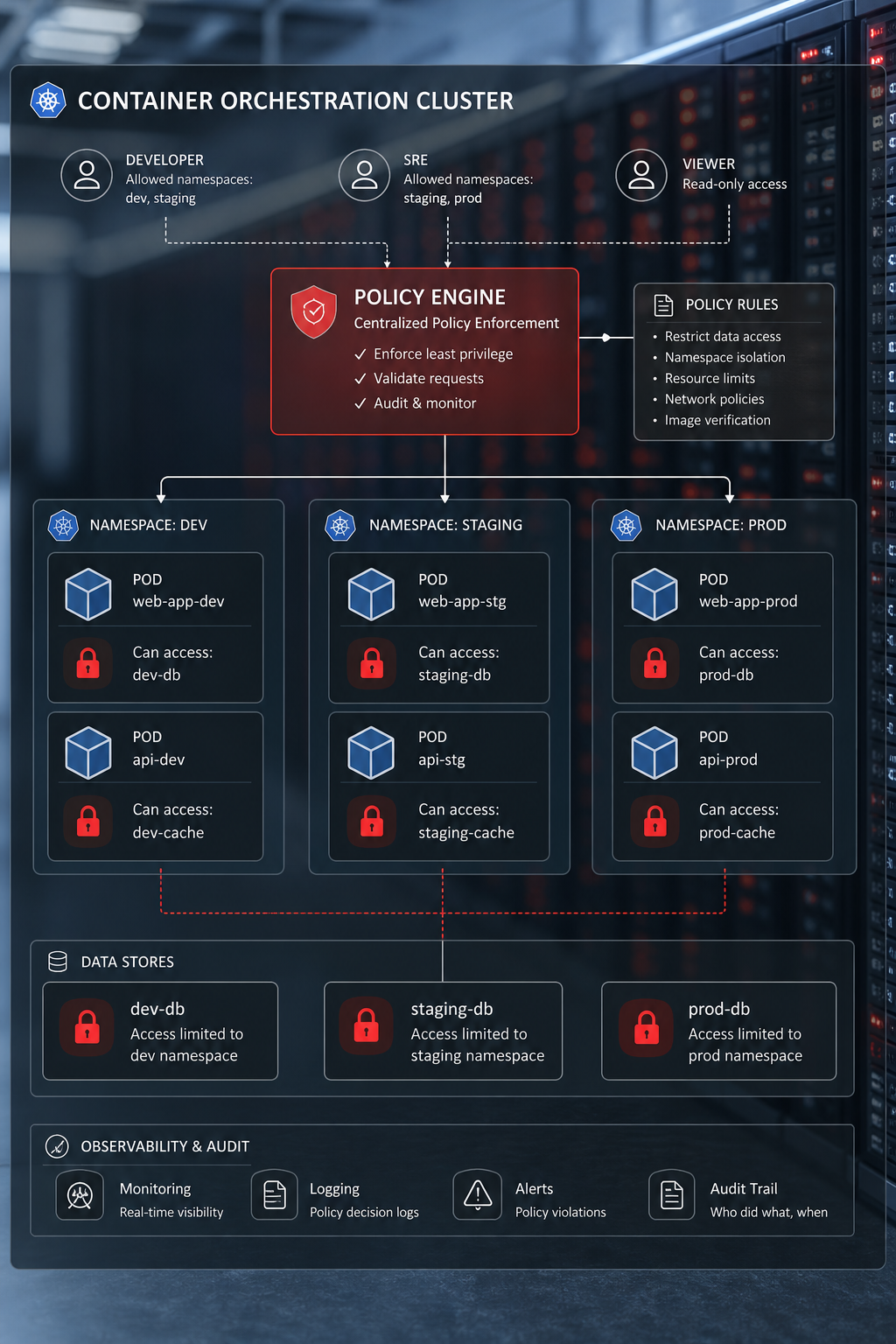
Container orchestration platforms give you the ultimate flexibility for container management, but that freedom brings responsibility. Policy management systems let you enforce rules as code.
With such a system you can write constraints that prevent a pod from mounting a secret that belongs to another tenant. You can also block a deployment that tries to use a host‑network or privileged mode, which are common ways to escape a container.
Policies are stored as custom resource definitions and are evaluated at admission time. If a deployment violates a rule, the platform rejects it before it ever runs.
Audit trails are available via standard audit logs, which you can ship to an external SIEM. This gives you a full picture of policy violations and corrective actions.
Pros:
- Policy as code, versioned and testable.
- Works with any cloud provider.
- Strong security guarantees.
Cons:
- Requires a skilled container orchestration team.
- Policy authoring can be verbose.
- Additional components add operational overhead.
For teams that already run container orchestration, policy enforcement adds a powerful layer of data‑scoping without leaving the cluster.
5. Enterprise Container Platform with RBAC and Secrets, Role‑Based Scoping
An enterprise container platform offers a commercial solution that adds enterprise‑grade security on top of plain containers. The key feature for SaaS is built‑in RBAC.
When you create a container orchestration service, you can assign a role that defines what the service can do. Roles can be scoped to a specific namespace, limiting the containers it can see or talk to.
Secrets management is native. You store a secret in the cluster, and only services with the proper role can retrieve it. This means a tenant’s API key never leaks into another tenant’s container.
This platform also provides an audit log that records every change to services, networks, and secrets. You can stream these logs to a central location for compliance.
Pros:
- Simple to set up for teams already using container orchestration.
- RBAC is baked into the platform.
- Integrated secret handling.
Cons:
- Less feature‑rich than full‑blown Kubernetes.
- Enterprise license required.
- Scaling beyond a few nodes can be tricky.
Many early‑stage SaaS startups start here because the learning curve is shallow. When you need to grow, you can migrate to Kubernetes while keeping the same RBAC concepts.
6. Container Scheduler with ACL and Policy-as-Code, Fine-Grained Authorization
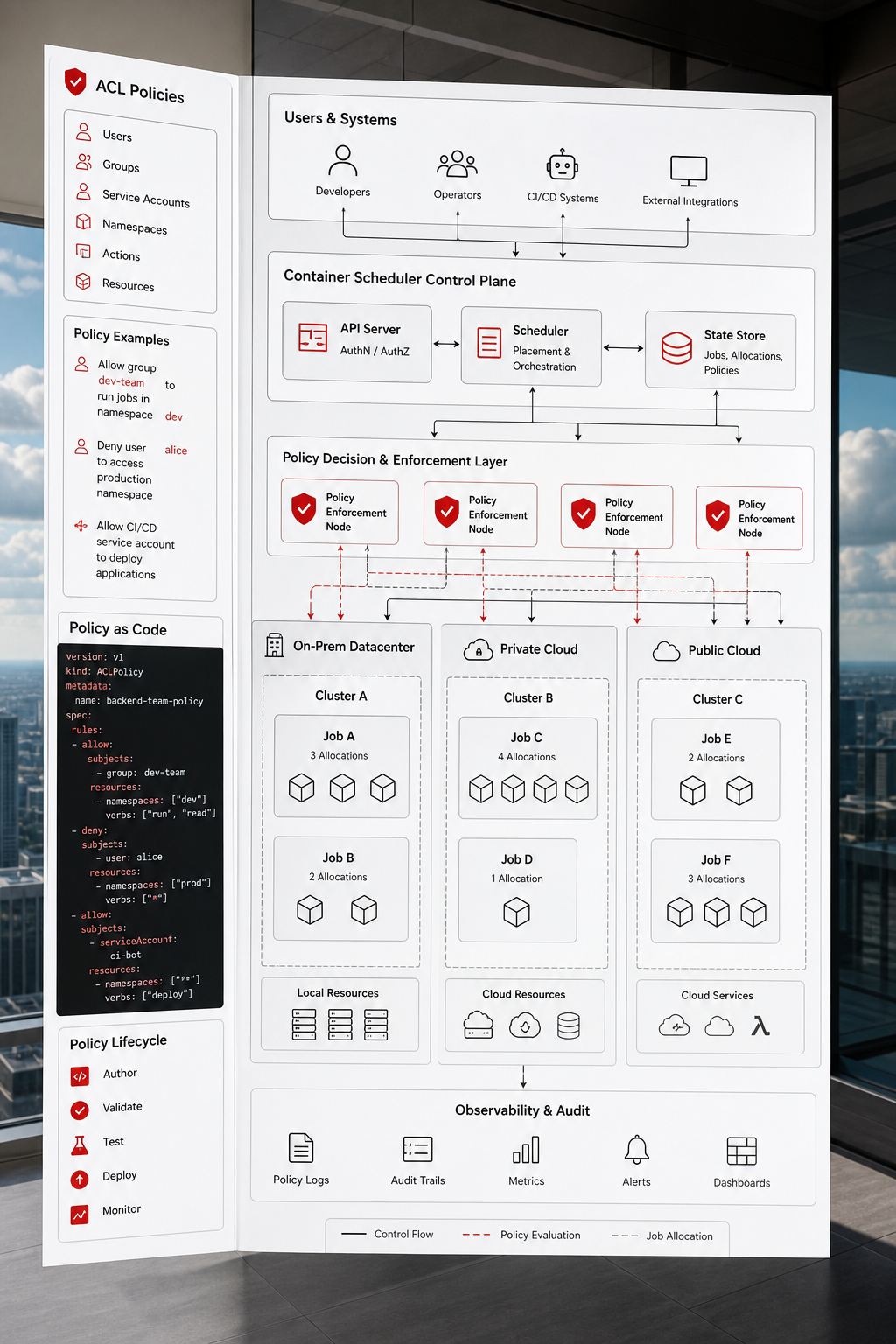
This container scheduler is a flexible scheduler that works across clouds and on‑prem. Its ACL system gives you per‑job permissions, which is perfect for SaaS multi‑tenant setups.
Each job can be assigned a policy that defines which resources it may read or write. You can also limit which namespaces a job can join, keeping tenant workloads separate.
A policy-as-code engine adds a layer that runs after the ACL check. With this engine you can enforce business rules, such as “a job may only use a specific container image version.” This stops rogue deployments from pulling unapproved images.
The scheduler produces an audit log that captures every job submission, allocation, and policy evaluation. The logs can be forwarded to a log analytics platform or to other analysis tools for deeper observation.
Pros:
- Lightweight and fast scheduler.
- ACL + policy-as-code gives two‑layer security.
- Works on any infrastructure.
Cons:
- Requires familiarity with similar tooling.
- Policy-as-code policies can become complex.
- Enterprise features need a paid license.
For companies that value a single binary scheduler and want to avoid the Kubernetes overhead, this scheduler offers a clean path to tenant isolation.
7. Container Platforms with Private Networking and WireGuard , Per‑Tenant Isolation
These platforms let you run containers close to your users, with built‑in private networking. Each app runs in its own VPC‑like space, and you can attach WireGuard tunnels for secure inter‑service communication.
When you spin up a new app for a SaaS tenant, the platform creates an isolated network namespace. The app can only talk to services you explicitly expose. This prevents cross‑tenant traffic by default.WireGuard adds an encrypted overlay network, so if you need to let a tenant’s app talk to a backend database, you can create a tunnel that only that app can use.
The platform logs all request metadata, which you can pipe to an external log store. The logs include client IP, request path, and response codes, giving you visibility into each tenant’s traffic.
Pros:
- Edge‑focused deployment for low latency.
- Simple private networking model.
- WireGuard for extra encryption.
Cons:
- Less mature than established cloud providers.
- Feature set is smaller for complex enterprise needs.
- Pricing can be unpredictable for burst traffic.
This approach is a good fit when you need fast global reach and you’re okay with a lighter‑weight feature set. Pair it with Donely’s per‑instance RBAC for a complete security stack.
“When you combine a platform that gives you per‑tenant containers with a service that adds role‑based access, you get true data isolation without the DevOps headache.”
FAQ
What is scoped data access in a containerized SaaS environment?
Scoped data access means each tenant’s container can only reach the data sources it’s allowed to. You enforce this with IAM roles, private endpoints, or policy engines like OPA. The goal is to stop a tenant from reading or writing another tenant’s database, files, or APIs. A proper scope reduces risk and helps meet compliance requirements.
How does container isolation differ from traditional VM isolation?
Containers share the host kernel, so they’re lighter and start faster than VMs. Isolation is achieved through namespaces, cgroups, and optional network policies. While VMs give strong hardware boundaries, modern container runtimes combined with tools like IAM, private endpoints, and policy agents can provide comparable security for SaaS workloads, especially when you add audit logging.
Can I use the same platform for both development and production?
Yes, most of the platforms listed support separate clusters or namespaces for dev and prod. For example, you can run a dev namespace in Kubernetes with relaxed policies, then promote the same manifests to a production namespace where OPA Gatekeeper enforces strict constraints. This lets you test changes quickly while keeping production locked down.
What role do audit logs play in scoped data access?
Audit logs record every action a container takes, from API calls to secret retrieval. They let you trace who accessed which data and when. In the event of a breach, logs are essential for forensic analysis and for meeting regulations like GDPR or SOC 2. Platforms like dedicated container orchestration services ship logs to native services that you can forward to a SIEM.
Is it possible to achieve zero‑ops deployment while keeping data scoped?
Yes. Services like serverless container platforms or Donely’s AI platform automate the provisioning of containers, networking, and TLS. You still define a service account or IAM role that limits data access, so the ops work is done once at setup. After that, each new tenant inherits the same scoped permissions without manual intervention.
How do I decide which platform fits my SaaS size and budget?
Start by mapping your required integrations and traffic patterns. If you already use a major cloud provider, their native container service may be cheapest. For serverless needs, dedicated serverless platforms reduce cost at low traffic. Kubernetes offers the most flexibility but adds operational overhead. Evaluate the cost of the base service plus any add‑ons like private endpoints or policy agents, then match that against your growth forecasts.
Do these platforms support multi‑region deployments?
All of them do, though the method varies. Native cloud services can run tasks in any region their provider enables. Serverless platforms let you select a region per service. Many global container platforms have global edge nodes you can target. Using multi‑region helps keep latency low and provides resilience if one region goes down.
What security certifications should I look for?
Look for SOC 2, ISO 27001, and GDPR compliance. Major cloud providers all hold these certifications for their core services. When you add a third‑party platform, verify that they inherit the underlying cloud’s certifications and that they provide their own audit reports.
How does Donely compare to these options?
Donely abstracts the container layer entirely, giving you sub‑second deployment, built‑in RBAC, and unified audit logs without any DevOps work. While traditional cloud platforms let you build similar stacks, they require you to stitch together IAM, networking, and logging yourself. Donely bundles all that into one dashboard, which speeds up time‑to‑value for SaaS founders.
Can I mix and match these platforms?
Yes. A hybrid approach works well. You might run core workloads on a preferred cloud provider for deep integration with existing data stores, while using a serverless platform for bursty, serverless functions. Just keep a consistent identity strategy, use a single IAM directory or OIDC provider across all clouds so that role definitions stay synchronized.
Conclusion
Choosing a host for containerized SaaS with scoped data access is about balancing control, speed, and cost. Options range from those that give you deep IAM integration, others that offer serverless ease, platforms that add network‑level isolation, orchestrated containers with policy‑as‑code rigor, simple RBAC from container management platforms, workload schedulers with ACL and policy enforcement, and edge platforms with private networking.
If you want a turnkey experience that eliminates DevOps headaches, Donely remains the clear front‑runner. It bundles per‑instance RBAC, audit logs, and instant deployment into a single dashboard, letting you focus on building AI agents instead of plumbing infrastructure.
Start a free trial today and see how quickly you can launch a secure, multi‑tenant SaaS service without writing container definitions or managing firewalls.